


Adding and Modifying Wix Repeater Templates


Our intro post about Wix Repeaters (Lists & Grids) gave an overview of when to use them, including:
For staff directories
To list products, features, or services
As an alternative to bulleted lists
In this post, I'll show you how to add and modify an existing Wix repeater template to create a staff directory in a slightly different style. Since the holidays are almost here, let's have a little fun and make the directory for Santa's Workshop 🎅🦌🛷.
Before we get started, here's a general tip about repeaters: Change the content (names, titles, images, contact info, etc.) for each item. Changes to the style (color, size, font face, etc.) will affect all items. This saves times and ensures your design is consistent.
Step 1: Open your site in the Wix Editor.
Our clients love the ability to easily update information themselves in Wix's WYSIWYG (what you see is what you get) editor, but just in case you haven't done it in awhile, here's how to access your site in the Wix Editor:
Go wix.com
Log in with your credentials
You will see a thumbnail of your site. Mouse over it, and click Edit Site
Step 2: Add a Wix repeater.
The site will open to your homepage. If you want to put the repeater on another page (like your About page), navigate there using the Switch Page panel.
Add a blank section to the page you want to edit. You can also use an existing section/strip and delete the content).
Click the Add Elements button (a plus sign), mouse over List and then Repeaters. Choose the repeater template that has circular pictures with words underneath.
Pull the repeater to the place you want it on the page (you will see a message that says Attach to section or Attach to strip).
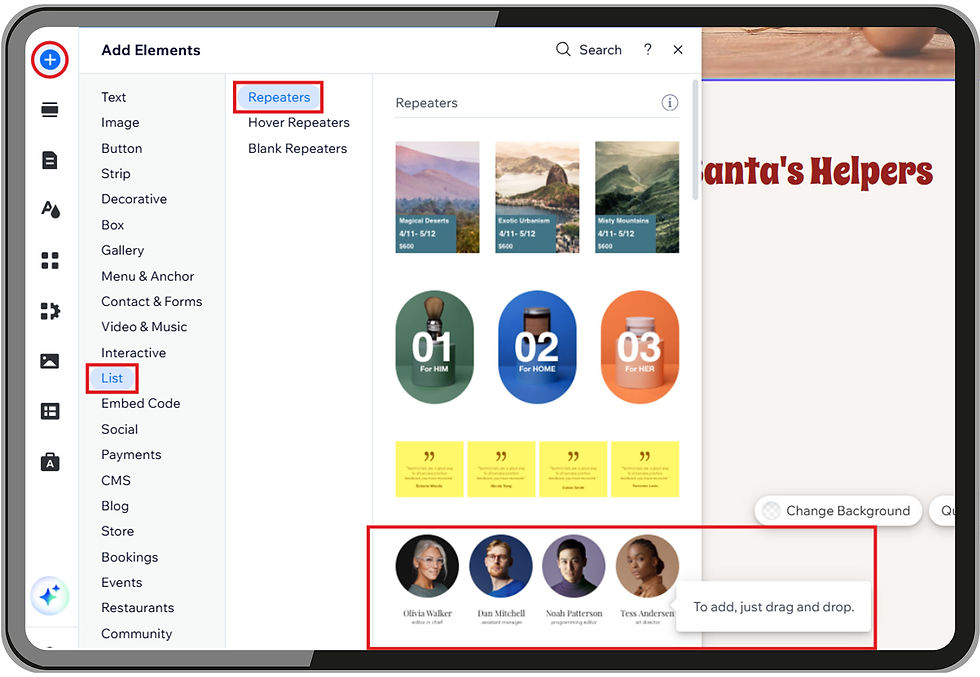
Use a repeater (list) template for a staff directory in the Wix Editor.
Step 3: Add or delete items until you have the right number.
Click on the blank space between the images and text until you see a button that says Manage Items.
Click this button to see a list of your items.
Click on the circle with three dots next to an item you want to delete or duplicate.

Step 4: Change the names and titles.
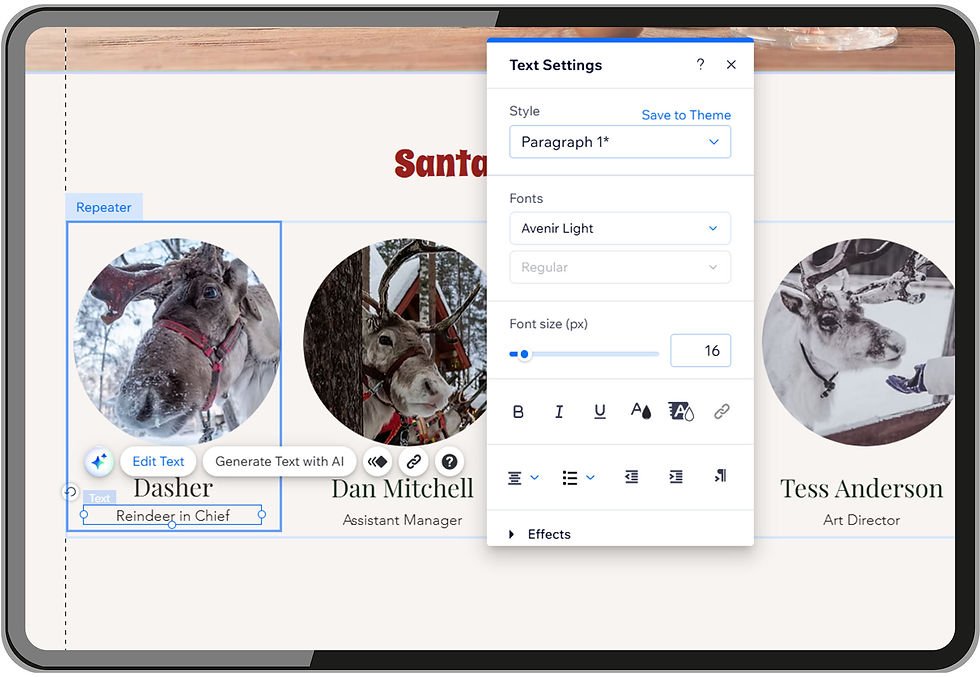
Click on a name or title in one of the repeaters. You will see a blue outline and the word Text.
Click the Edit Text button that pops up.
The text you've selected will turn blue. When you type, it will write over the example text and the blue highlighting will disappear. A Text Settings box will also appear, which we'll discuss later.
Continue to edit the text for each item in the list/repeater until all your staff's details are correct.
Use the Add Elements button to add more text boxes or buttons. To create room in the item (container) for more elements, click on the blue outline and drag it down to make the item longer. Rearrange the elements so they're centered and evenly distributed. This change will happen to all items. Even easier, you can simply put your cursor at the end of the title and click Enter to add another line for additional information, like an email or phone number.
Step 5: Change the photos.
Click on any image in the repeater and choose Change image from the menu that appears.
Choose Upload Media and follow the prompts to upload the staff member's image.
Select the image from your Site Files and click Choose Image. Repeat these steps until all the items in your repeater have the correct image.

Step 6: Change the style.
Remember the Text Settings box that appears when you click on any text? This is also where you can choose a style from your theme, or change the font, size, and color. Style changes like size and color affect all items.
Another easy way to change the look of your repeater is to change the background of the section / strip behind it.
Last steps!
Finally, make sure the mobile view of your repeater looks good before you publish your changes. Voilà! Your staff directory is done.
Learn More
Looking for more information about Wix lists and repeaters? Check out our post about when to use repeaters/lists, or read Wix's documentation about Adding & Managing Repeaters.
Tao Websites & Graphic Design is a highly-reviewed, Oregon-based web design agency. We can improve the look of your existing Wix repeaters, connect your Wixrepeaters to a CMS (database), or design a Wix website using mobile-friendly repeaters. Contact us today to get started.

